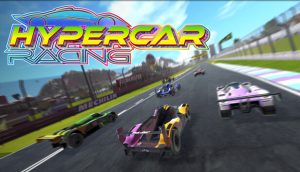
Welcome to Hyper Car, the exciting game developed by Te Creater that will put your driving skills to the ultimate test! With nine different levels, Hyper Car offers players a thrilling and challenging experience. You’ll be driving a hyper car – a purple-black car that moves at hyper speed – through exciting stunts and obstacles. Your goal is to reach the finish line in one piece, but be warned – you’ll need to balance your speed to avoid rolling over. The game is addictive and challenging, and players will need to sharpen their balance skills and reflexes to succeed.

Hyper Car features nine unique levels, including Basics, Spline Bridge, Rope Bridge, Motors, Custom Wheels, Sliders, Variables, Jump and Stretch. Each level offers a unique set of challenges, guaranteeing hours of entertainment. And with its stunning 3D graphics, Hyper Car is a feast for the eyes. Are you ready to take on the challenge and become the ultimate Hyper Car driver? Play now and find out!

Tips: You need to navigate through challenging obstacles such as overlapping bridges, areas requiring risky aerial stunts, and rough road surfaces. Timing is critical when it comes to accelerating and decelerating to maintain the correct speed and ensure your car’s safety. Remember that collisions will cause your car to explode into many pieces. As the car is incredibly fast, avoid holding down the pedal for too long.

How to play

To play, touch the screen and choose the right button. Finish the level you’re on and then go to the next one.

  • Press W, D, X, or the Up arrow, Right arrow, or Mouse click to move forward.
  • Press S, A, Z, or Down arrow, Left arrow to move backward.

Spacebar Clicker is an idle game where you press the spacebar to collect spacebars, and then you receive upgrades to help you collect even more! The progress is automatically saved, so you can leave and return without losing your progress. Score points by clicking on the spacebar on the screen without any rules or special requirements.

CrociDB developed Spacebar Clicker. You can also play Capybara Clicker.
How to press the spacebar faster?

The best way to click the spacebar quickly is to press it halfway with one finger and click it quickly with one finger on the other hand. Professional gamers know that this is the best way to click. You can also play games like Dino Game and Flappy Bird that have you click the space bar. It helps you break records or make new ones in the Spacebar Clicker challenge. Have fun!

How to play

To interact with the game’s interface, press the spacebar.

Are you looking for a lot of action and excitement? Then have fun with Slope Game 3D! The whole game offers 1 game mode. It’s an endless mode, so you’ll be playing all the time. Get the ball to the goal. There’s nothing like speeding down on a slope with reckless abandon near obstacle course with dangerous slippery blocks.

It won’t be all that easy with the speed with which the ball 3D is descending, but it can be done. You need to take care about the red obstacles, since the game ends when you touch them. Collect yellow gems to improve your score. The obstacles in these higher levels are more dynamic and challenging. You can expect moving platforms or great jumps in this 3D game. If you manage to tumble off the platform, you will have to restart the game and lose one life.

Take care not to lose control of the ball and try to cross the finish line first. Keep your ball on the platforms while avoiding the numerous obstacles and performing somersaults at your best. Each level is generated at random, making each race unique and varied.

You can start your game anew by clicking the ‘Again’ button once the ball has crashed. Don’t forget to collect all the bonuses along the way to gain more speed.

You can also call your friends, so good luck!

Slope Game is similar to many other running games in that you run indefinitely to gain score. Popular alternatives include Run 3 and Tomb Runner, both of which are terrific and addictive!

What’s New:

1. New function: Rapidly changing courses that become harder and more unpredictable.

2. Optimized game design:

* Eye-catching neon graphics and style.

* Full-screen mode available.

Tips

* Always Ready! There’s a period of time at the start of every round that lets you prepare yourself before join in the new round.

* Don’t always prioritize collecting the boosters. Make sure you place a significant amount of focus on increasing your score.

How to play

Luckily for casual gamers, Slope Game has very straightforward controls. You can control your ball 3d by using several keys. Before the beginning of any game, Slope game guides you on how you can control. The ball is controlled with the arrow keys on the keyboard. Steer your ball along the course with the arrow keys avoiding the obstacles, walls, etc. Make sure to keep the ball on the track.

Use your keyboard to do so:

* LEFT ARROW = Move Left

* RIGHT ARROW = Move Right

If you play on mobile touch, you can use Left – Right screen side

Slope Ball is an interesting ball game for playing browser. This game is highly addictive and challenging. Now move the ball, avoid falling off of the edge, and go as far as possible.

Robert Alsin made Slope Ball.

Features:
Two game modes: Normal and Endless
Colorful platforms and background
Many unlockable new balls
Spin to get a reward
Cool music

How to play

Drag left mouse button to move the ball left and right.

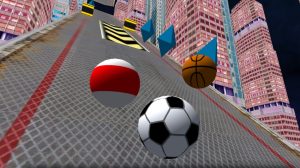
Slope City is an arcade game with similarities to the awesome Slope Game title in which you must manage your ball at maximum speed down dizzyingly fast slopes in the city. Consider the distance to predict and dodge numerous traps and obstacles, use the accelerators to gain speed, and see your ball float as you make leaps thanks to its wings. This game contains platform problems and obstacles, so be cautious. With the diamonds you acquire, you can unlock 9 unique ball skins!

Slope City is made by AYN Games.

How to play

Press A/D or left/right arrow to steer left/right